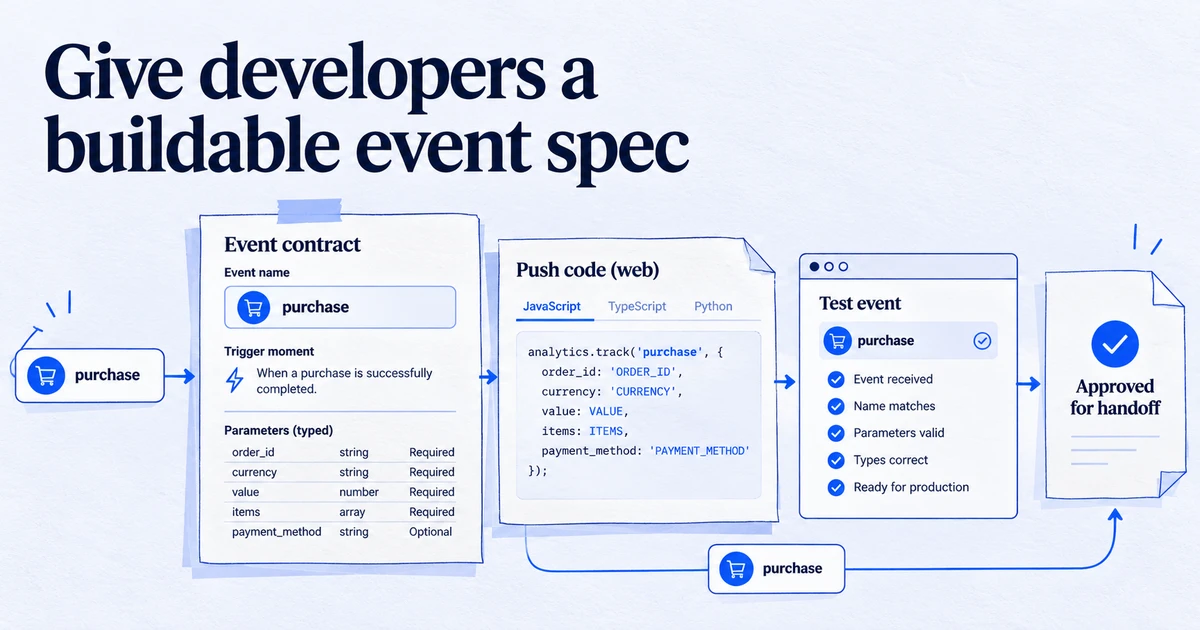
The dataLayer is a JavaScript array on a web page, named window.dataLayer by default, that the website uses to pass events and values to Google Tag Manager and gtag.js. Developers push structured objects into it, and tags, triggers and variables read from it, so tracking does not depend on scraping the page.
Tags need facts about what happened on a page: which product was viewed, what the order was worth, whether the visitor is logged in. Reading those facts from the page's HTML breaks every time the design changes. The dataLayer is the agreed place where the website writes them down for the tag manager to read.
How it works
The dataLayer is an ordinary JavaScript array on window. Google's documentation describes it as an object used by Google Tag Manager and gtag.js to pass information to tags. The site declares it once, then appends objects with push():
window.dataLayer = window.dataLayer || [];

window.dataLayer.push({
  event: 'sign_up',
  method: 'email',
  user_type: 'trial'
});
Google Tag Manager watches the array. Each push is processed in order and merged into Tag Manager's internal data model. If the push contains an event key, Tag Manager treats it as an event that Custom Event triggers can respond to. Data Layer Variables in GTM then read values such as method or ecommerce.value at the moment a tag fires.
For GA4 ecommerce, Google recommends clearing the previous ecommerce object before each new one:
window.dataLayer.push({ ecommerce: null });
window.dataLayer.push({
  event: 'purchase',
  ecommerce: {
    transaction_id: 'T-10293',
    value: 84.50,
    currency: 'EUR',
    items: [{ item_id: 'SKU-42', item_name: 'Trail shoe', price: 84.50, quantity: 1 }]
  }
});
The gtag.js snippet uses the same array: its gtag() function simply pushes its arguments into dataLayer, which is also how Consent Mode defaults and updates reach the tags.
Why it matters in 2026
The dataLayer is the contract between developers and marketers. When it is well specified, a new GA4 event, a Google Ads conversion or a Meta event can be built in GTM without another release of the website. When it is missing or inconsistent, every tag depends on CSS selectors and page text, which break quietly.
It also feeds the newer parts of the stack. A server-side tagging setup forwards what the browser tag collected, and user data for enhanced conversions is usually read from the dataLayer. Errors at this layer travel all the way to bidding.
How to check it
- Open GTM Preview and load the page. Each push appears as a message in the left panel.
- Select a message and open the Data Layer tab to see the exact object pushed and the merged state after it.
- In the browser console, type
dataLayerto list everything pushed so far. - Complete a key action, such as a test purchase, and confirm the event name, values, currency and item array match your specification.
- Check that the variables in the Variables tab resolve to the values you expect, not
undefined.
The GTM audit checklist includes the dataLayer checks we run on every container.
Common mistakes
- Overwriting instead of pushing.
dataLayer = [{...}]placed after the GTM snippet replaces the array GTM is watching, so later pushes are lost. - Wrong casing. The name is case-sensitive:
datalayerorDataLayeris a different variable. - Values as strings.
value: "84,50"with a comma will not be summed as revenue. - No ecommerce reset. Items from one event leak into the next.
- Pushing after the redirect. A purchase push on a page that redirects immediately may never be processed.
Related terms: Measurement Protocol, Conversions API.
Frequently asked questions
Is the dataLayer only for Google Tag Manager?
It was designed for Google Tag Manager and gtag.js, and both read window.dataLayer by default. Other tag managers and tools can read the same array, and many CMS and ecommerce plugins push to it. The format is a convention, not a standard owned by any vendor.
Where should the dataLayer be declared?
As high in the page source as possible, above the Tag Manager container snippet. Any values that must be available when the page loads should also be pushed above the snippet. Later pushes can happen at any time, for example after a click or a purchase.
What does the event key do in a dataLayer push?
In Google Tag Manager, a push that contains an event key creates an event that Custom Event triggers can listen for. A push without an event key still updates the stored values but does not, on its own, fire a trigger.
Why should I push ecommerce: null before an ecommerce event?
Google's ecommerce guide recommends clearing the previous ecommerce object first. Without it, items from an earlier event, such as a view_item_list, can merge into the next one and end up in the wrong event.
Sources
Dimitris builds Tracking Whisper and writes about tracking, analytics and data from the work the agent does every day: GTM containers, GA4 properties, ad platforms and the numbers in between.